Main
🏠 Home ℹ️ About Us
WhatsApp
💬 WhatsApp Business API (WABA) 🔐 OTP & TAC via WhatsApp 🤖 WhatsApp + AI Chatbot 🔵 Blue Tick Verification 🤖 AI Chatbot & Auto-Response 🎨 Automation Flow Builder 🔘 Interactive Messages 💡 Automation Use Cases 📱 Business App Coexistence
SMS
📱 One-Way Bulk SMS 🔒 Two-Factor Authentication (2FA) 🌏 Global SMS Coverage ⚡ SMS API
Email & API
✉️ Email Service Overview 🔌 Email SMTP API 🛠 REST API Reference
Queue System
🏢 Queue System Overview 💬 WhatsApp QMS ☁️ Cloud QMS ⚡ Cloud + WhatsApp QMS 📖 Cloud & WhatsApp QMS Guide 🎯 Request Free Demo
Pricing
💰 Full SGD Rate List 🛒 Buy SMS Credits
Support
📩 Contact Us ❓ FAQ 📖 End-User Guide ⚠️ Service Advisory
🔑 Login 📝 Register Free

Chapter 21 · Part 3

Credit Reminder

Never get caught short mid-campaign. Set a balance threshold and iSMS will email you when your credit drops below it — giving you time to top up before sending stops.

Setting up the reminder

Go to User Profile → Credit Reminder. The summary at the top shows your current mode, SMS threshold, and how many WhatsApp numbers are covered.

  1. 1

    Reminder Type

    Choose how you want to be alerted — Email Notification.

  2. 2

    SMS Credit Threshold

    Enter the number of credits at which to warn you (e.g. 30,000). When your balance falls below it, the reminder is sent.

  3. 3

    Notification Email

    Enter the email address the reminder should go to.

  4. 4

    WABA credit thresholds

    If you use WhatsApp Business API, set a separate threshold for each WhatsApp number so you’re warned per number too.

  5. 5

    Save

    Click Save Settings to activate the reminder.
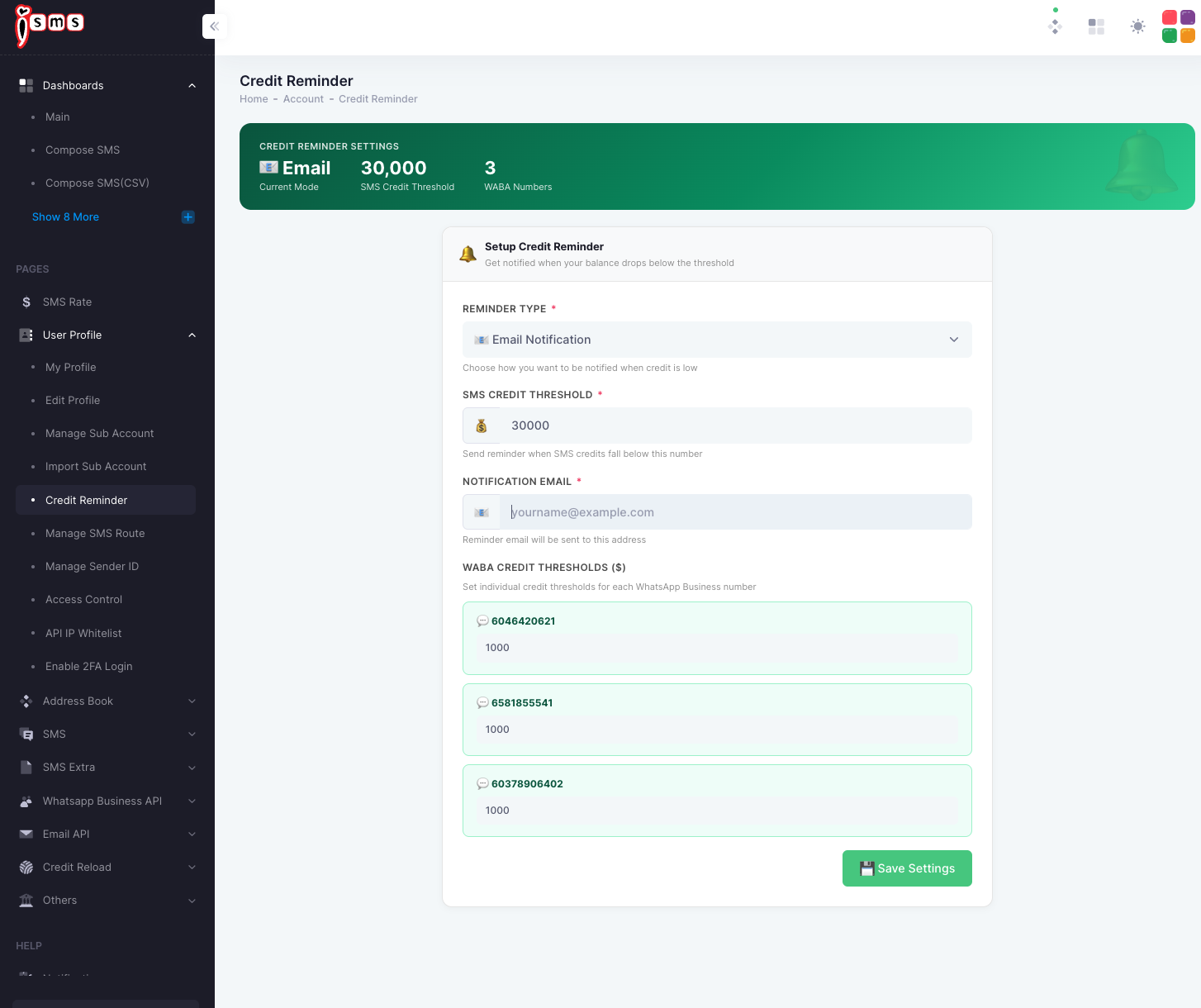
The iSMS Credit Reminder settings: reminder type, SMS credit threshold, notification email, and per-number WABA credit thresholds.
Fig. 1Credit Reminder settings — SMS threshold, email, and per-number WABA thresholds.

When you get reminded

Balance falls

As you keep sending

Hits threshold

Drops below your number

Email sent

To your notification address

Top up in time

Reload before it runs out

Set the threshold high enough to leave time for a top-up to clear — especially before a large scheduled send.
Need help?
Our team is happy to assist with anything in this guide. Contact us →
💬