Chapter 45 · Part 6
Messenger Conversations
Every customer who messages your Facebook Page lands here. Reply with text or attachments in real time — the inbox works just like the WhatsApp one, with one key rule: the 24-hour reply window.
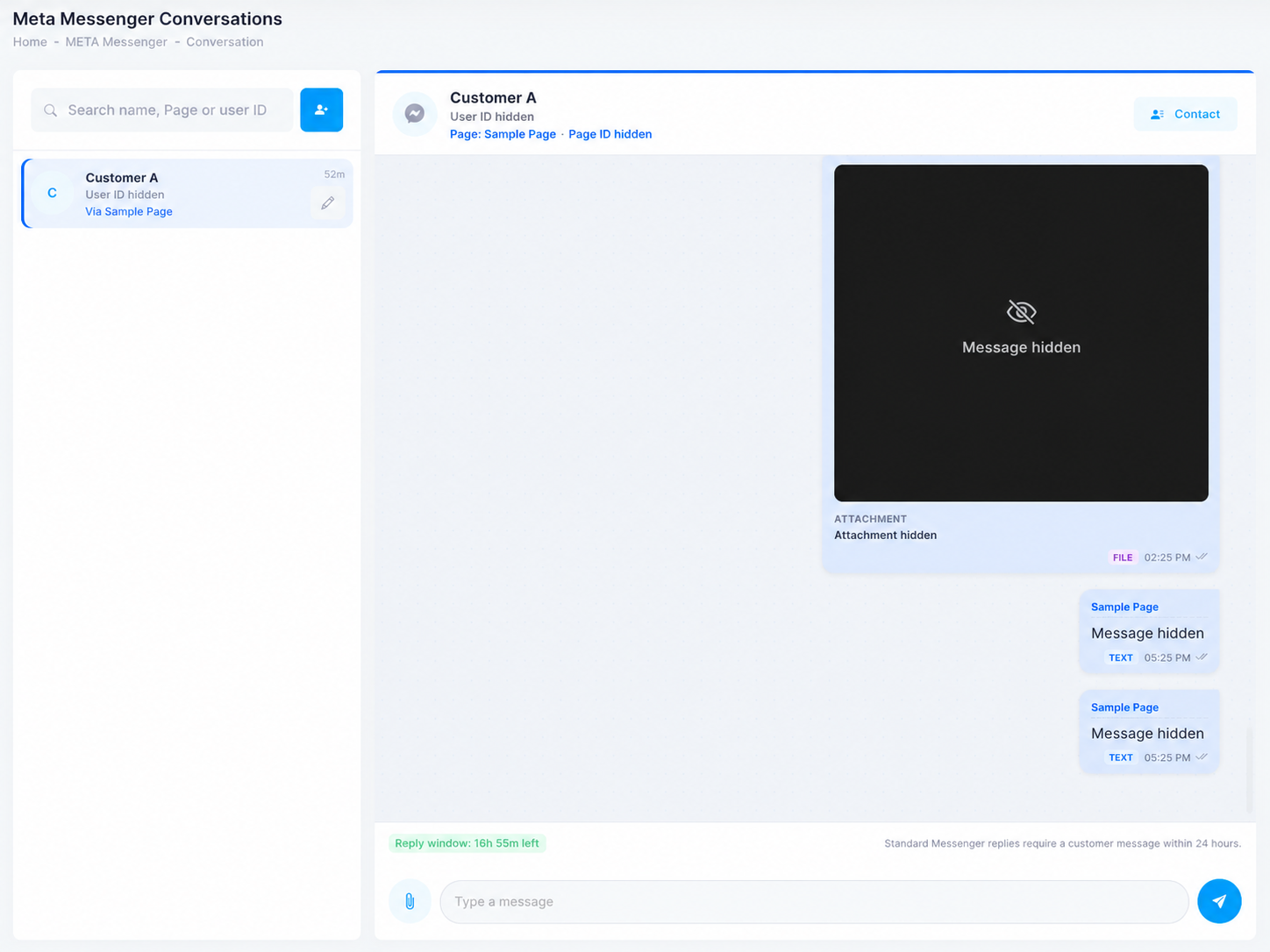
Around the inbox
Open META Messenger → Conversation:
- Conversation listEvery chat, newest first, showing the customer and which Facebook Page they messaged. Search by name, Page, or user ID.
- Chat threadThe selected conversation — text and file messages are labelled, with delivery ticks and timestamps. Type a reply or attach a file with the paperclip.
- Reply window countdownAbove the composer, e.g. “Reply window: 16h 55m left” — how long you can still reply free-form to this customer.
- ContactSaves the customer to the Page’s address book, so they can be selected in Send Message and CSV Send.
The 24-hour reply window
When you can reply
Customer messages
They message your Page
24h window opens
Countdown starts
Reply freely
Text or file, per message
Window closes
A new customer message reopens it
Standard Messenger replies require a customer message within the last 24 hours — each new customer message restarts the countdown.
Every reply is charged per message from your Messenger credit balance — including chatbot auto-replies. Incoming customer messages are free.
Need help?
Our team is happy to assist with anything in this guide. Contact us →